Digital Photo Storage Solutions in the Cotswolds: Preserving Your Legacy for 2026

Last Tuesday, a client from Chipping Campden called us in a quiet panic. The external hard drive holding over 15 years of their family photographs, from a child's first steps to last year's village fête, had simply stopped working. It’s a chillingly familiar story, isn't it? The sheer volume of digital images we create can feel overwhelming, and the nagging worry that they could all vanish in an instant is a genuine concern for many Cotswold families and businesses.
This guide is crafted to replace that anxiety with quiet confidence. We will demystify the world of professional-grade digital photo storage solutions, moving beyond the confusing jargon of iCloud versus Google Drive to help you establish a truly secure, archival system for your most treasured memories. By the end, you will understand a bespoke, three-part strategy that ensures your photographs are not only safe for 2026 and beyond but are also beautifully preserved and easily accessible for generations to come.
Key Takeaways
- Learn why a single backup drive is a high-risk strategy and how silent 'data rot' can corrupt your most precious files without warning.
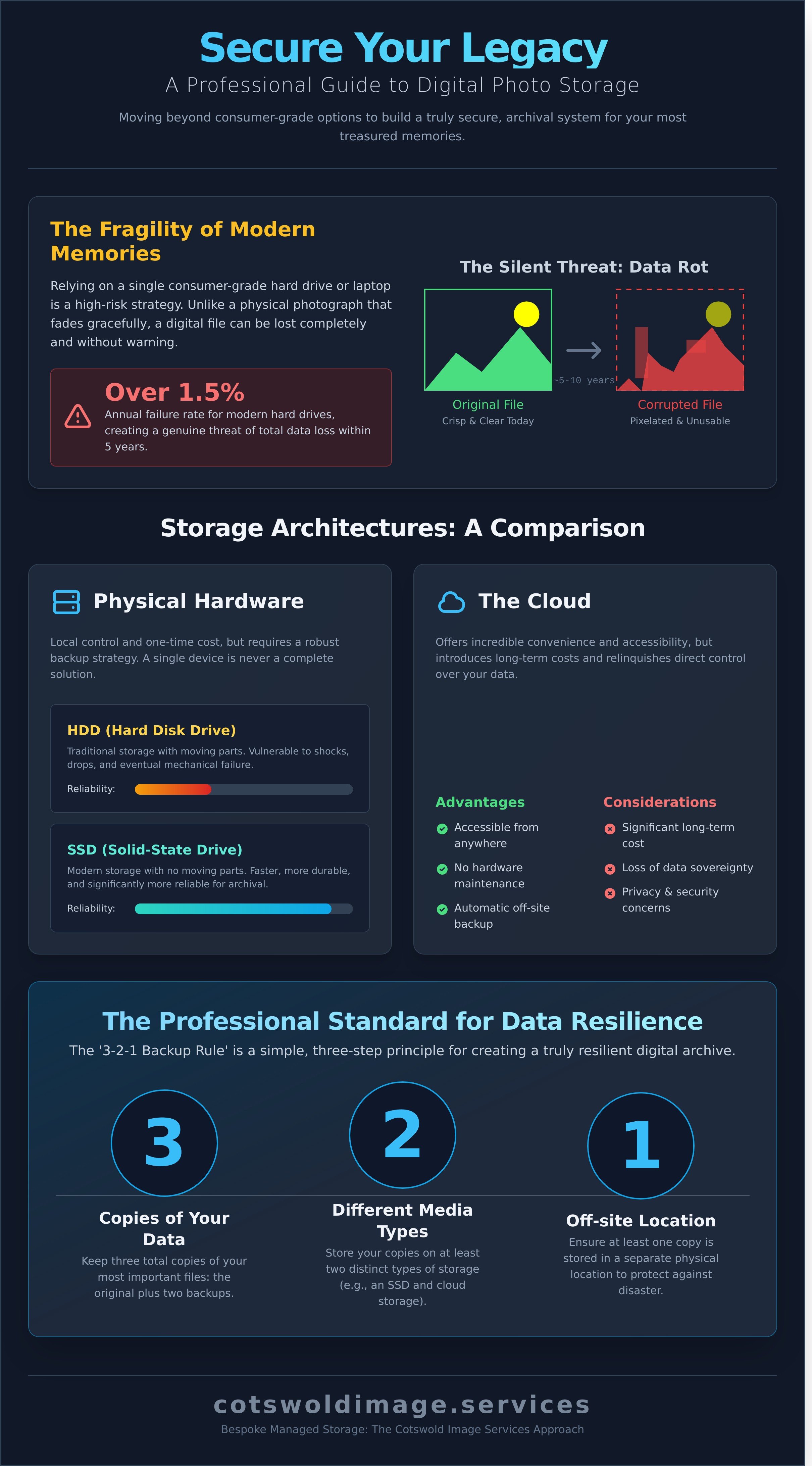
- Discover the professional '3-2-1 Backup Rule'-a simple, three-step principle for creating a truly resilient digital archive that withstands hardware failure.
- Compare the distinct advantages of hardware, cloud, and hybrid systems to determine the most suitable digital photo storage solutions for your family's specific needs.
- Follow a clear framework for centralising and curating your entire photo collection, transforming digital clutter into a cherished, organised family legacy.
What are Digital Photo Storage Solutions and Why Do They Matter in 2026?
When we discuss preserving family history, it's easy to picture a simple folder of images on a laptop. Yet, this view is dangerously incomplete. True digital photo storage solutions are not simply folders on a computer; they are multi-layered systems, bespoke strategies of redundancy and careful curation designed to protect your family's legacy for generations. It’s not just about saving a file; it's about safeguarding a story. As we look toward 2026, the sheer volume of digital images we create, from a christening in Cirencester to a quiet family walk in the Slad Valley, has made a professional approach more critical than ever.
Historians speak of a potential 'Digital Dark Age', a future where our era is a black hole of lost information. Relying on a single laptop or a consumer-grade hard drive is a recipe for this exact loss. Even the most reliable modern hard drives have an annual failure rate of over 1.5%, meaning the risk of total data loss on a single device within five years becomes a genuine threat. This stands in stark contrast to the shoeboxes of photographs tucked away in Cotswold attics, which have faithfully preserved memories for a century. The core challenge is one of permanence, a field known as digital preservation, which provides a framework for ensuring our digital assets survive long-term.
This is where we must distinguish between consumer-grade technology and 'Archival Grade' solutions. A standard USB stick or cloud account is designed for convenient, short-term access. It's disposable technology. Archival Grade storage, by contrast, is a robust ecosystem built for longevity, prioritising data integrity, security, and planned migration to future technologies. It’s the difference between a fleeting digital snapshot and a permanent family heirloom.
The Fragility of Modern Memories
Bit rot is the slow, silent decay of digital data over time, where individual bits of a file flip, corrupting the image from within. A photograph of a wedding at Sudeley Castle, crisp and clear today, could become a pixelated artefact in less than a decade. While a physical print from 1926 might fade gracefully over 100 years, a digital file from 2016 can fail completely and without warning. Meticulous, high-resolution scanning is the vital bridge, converting your fragile film, slides, and prints into stable digital masters before they degrade further.
Why Cheltenham and Gloucester Families are Seeking Professional Help
The constant cycle of new devices, confusing cloud subscriptions, and the nagging worry of a hard drive crash creates a kind of 'tech-stress'. We see a distinct move away from this DIY anxiety. Families in Cheltenham, Gloucester, and across the Cotswolds are instead seeking managed heritage services. They want the peace of mind that comes from entrusting their most precious assets to a local custodian, a specialist they can meet and speak with. Our professional storage services are seamlessly integrated with our restoration work, ensuring that once an image is secured, it can be brought back to its original vibrancy.
Comparing Hardware, Cloud, and Hybrid Storage Architectures
Once your precious photographs have been meticulously digitised, selecting the correct storage architecture is the most critical decision you will make for their long-term preservation. The choice is not merely technical; it’s about balancing security, accessibility, and cost. Understanding the distinct advantages and inherent risks of local hardware versus cloud services allows you to build a resilient home for your family’s legacy or your company’s visual assets.
Physical Hardware: SSDs vs. HDDs
For decades, traditional hard disk drives (HDDs) were the standard. However, their design, which relies on spinning platters and a mechanical arm, makes them exceptionally vulnerable to shocks, drops, and eventual mechanical failure. It’s not a question of if an HDD will fail, but when. Today, Solid-State Drives (SSDs) offer a far more robust alternative. Lacking moving parts, they are faster, more durable, and more reliable for archival purposes. For Cotswold businesses requiring instant access to large files, such as architects with property visuals or photographers with commercial headshots, modern NVMe SSDs provide unparalleled speed. Yet, it is vital to remember that a single piece of hardware is never a complete solution; it is only one component of a larger preservation strategy.
The Cloud: Convenience vs. Sovereignty
Cloud storage from providers like Google, Apple, and Dropbox offers incredible convenience. Your images are accessible from anywhere, and the responsibility for hardware maintenance is removed. This convenience, however, comes with its own considerations. The subscription model can become a significant long-term expense; a seemingly modest £7.99 monthly fee for 2TB of storage accumulates to over £950 in a single decade. Furthermore, you are entrusting your most personal memories or confidential corporate event photography to a third party, raising valid questions about privacy and data sovereignty. Who truly has access to your files? This is why the most robust digital photo storage solutions now favour a hybrid approach.
The gold standard for modern digital preservation is known as the ‘3-2-1 Backup Rule’. The principle is wonderfully simple and effective:
- Keep at least three copies of your digital archive.
- Store these copies on two different types of media (e.g., an SSD and a cloud service).
- Ensure at least one of these copies is held off-site.
Why DIY Storage Often Fails: From Hardware Corruption to 'Data Rot'
The most common assurance we hear from clients is, "I have a backup drive in the drawer, I'm fine." While this is a sensible first step, relying solely on a single consumer-grade hard drive is like storing your family's priceless heirlooms in a cardboard box in the loft. It feels safe, until the day it isn't. The hidden dangers to your digital archive extend far beyond a simple crash; they are subtle, silent, and can erase your history without warning.
A professional digitisation process isn't merely about scanning; it is the preventative medicine for your archive. It anticipates the risks you haven't considered, from the slow decay of file data to the obsolescence of the very software used to view them. It transforms a fragile collection of files into a resilient, future-proof family legacy.
The Reality of Hardware Failure
Every electronic storage device follows a predictable lifecycle, often illustrated by the 'bathtub curve'. Failure is most likely during the initial 'infant mortality' phase (the first few months) or the final 'wear-out' phase after three to five years. That drive in your drawer is ageing, its mechanical parts are degrading, and its failure is an inevitability, not a possibility. When it does fail, the cost of specialist data recovery in the UK often starts from £400, with no guarantee of success. This is a reactive, expensive, and stressful last resort.
Format Obsolescence and Metadata Loss
Your choice of file format today dictates whether your great-grandchildren can view these memories tomorrow. While JPEG is a convenient format for sharing, its 'lossy' compression discards a small amount of image data every time the file is edited and saved. For a master archive, this is unacceptable. We create archival-grade TIFF files, a 'lossless' format that preserves every single pixel of the original scan, ensuring the highest possible fidelity for generations.
Equally tragic is the loss of context. A photograph without the story of who, where, and when is just an image. Simple file transfers can strip this vital metadata, effectively erasing the handwritten notes on the back of the original print. Our meticulous process at Cotswold Image Services embeds this information directly and permanently into the digital file, ensuring the story is never separated from the picture. We believe that effective digital photo storage solutions must preserve not just the pixels, but the personal history they represent.
The threats to a DIY archive are often invisible until it's too late. These risks include:
- Silent Data Corruption: Often called 'bit rot', this is the spontaneous degradation of data on a storage medium. A single incorrect bit can render a precious photograph unreadable, a corruption that often goes unnoticed for years on a dormant drive.
- Proprietary Software Lock-in: Storing your photos in a specific application's library (like an older version of iPhoto or Picasa) creates a dependency. If that software is discontinued, you may lose access to your organised albums, or even the images themselves.
- Single Point of Failure: A single backup drive, even if unused, is vulnerable to theft, fire, flood, or simple accidental damage. True preservation requires a robust, multi-location strategy.
By entrusting your history to a specialist, you are not just scanning photos. You are investing in a comprehensive preservation strategy that safeguards your memories against the very real and varied threats of the digital age.
A Professional Framework for Organizing Your Cotswolds Archive
Transforming a chaotic collection of digital files and dusty photo albums into a coherent family legacy requires more than just good intentions; it demands a structured, professional approach. A well-organised archive not only protects your memories but makes them accessible and enjoyable for generations to come. This five-step framework provides a clear path from digital clutter to a beautifully curated collection, ensuring your family’s story is told with clarity and precision.
Following a methodical process is the key to creating a lasting digital inheritance. It turns an overwhelming task into a series of manageable actions.
- Step 1: Centralise Your Collection. Before any organisation can begin, you must gather every image into one place. This means consolidating photos from current and past mobile phones, old laptops, disparate SD cards, and USB drives. Crucially, this is also the stage where physical prints, slides, and negatives should be professionally digitised to create a single, unified starting point for your archive.
- Step 2: Curate with Purpose. The single most impactful step is selective deletion. It's tempting to keep every photo, but an archive filled with blurry images, duplicates, and near-identical shots is difficult to navigate and enjoy. Be disciplined. Your goal is to preserve the best version of each memory.
- Step 3: Standardise Naming Conventions. A consistent file name structure is the bedrock of an organised library. We recommend the format YYYY-MM-DD-Event-Location (e.g., 2022-07-16-SummerFete-Tetbury). This simple system automatically sorts your images chronologically, making any moment instantly findable without relying on complex software.
- Step 4: Implement Automated Redundancy. A single hard drive is not an archive; it’s a point of failure. Professional digital photo storage solutions rely on redundancy. Use a managed cloud service (like iCloud Photos, Google Photos, or a dedicated provider) to create an automated, off-site backup. This protects your legacy against fire, theft, or hardware failure.
- Step 5: Conduct an Annual 'Health Check'. Once a year, set aside an hour to review your archive. Check that your automated backups are running correctly, add any new images from the past year into your organised structure, and ensure file formats are still current. This small investment of time guarantees the long-term integrity of your collection.
The Art of Curation
Curation is not about loss; it's about focus. When faced with 200 photos from a single event, a professional photographer might select only the best 10 for the final collection. Adopt this mindset. Distinguish between 'working files' (temporary edits for social media) and 'archival masters' (the highest-resolution original). A smaller, curated archive of 1,000 exceptional images holds far more emotional and historical value than a disorganised folder of 50,000 mediocre ones.
Local Context: Organizing Your Cotswold Story
Bring your archive to life by embedding it in the local landscape. Use tags and keywords to identify Cotswold landmarks like "Broadway Tower" or specific venues like "The Slaughters Country Inn". By consistently tagging family names and locations, you can create a digital 'Heritage Map' of your life in Gloucestershire. For new photos, try our 'Walk & Talk' technique: as you capture images of a place, record a short voice note about its significance. This audio provides rich detail for your captions later, preserving the story behind the picture.
If the foundational step of digitising decades of family prints feels overwhelming, our bespoke archival scanning service can provide the meticulous, high-resolution foundation your digital library deserves.
Bespoke Managed Storage: The Cotswold Image Services Approach
While consumer cloud services offer a convenient place to deposit files, they lack the curatorial oversight essential for a true family archive. For those who view their collection not as data but as a legacy, we offer a different path. Our Secure Digital Image Storage Subscription is a premium, fully managed service designed to provide complete peace of mind. It’s a hands-off solution where the technical complexities of preservation are handled for you, ensuring your family’s story is protected for generations to come.
The core of our service is the reassurance of human expertise. Every collection entrusted to us is personally overseen by our founder, Anthony Paul, who brings over 20 years of dedicated technical experience to the craft. This isn't an automated process run by a distant algorithm. It is a meticulous, hand-finished approach where a local specialist, deeply invested in the Cotswold community, becomes the temporary custodian of your most precious memories. This personal oversight guarantees a level of care and nuanced judgment that technology alone cannot replicate.
More Than Just a Server
Our commitment extends far beyond simple storage. Before any image enters your private archive, it undergoes our meticulous high-resolution processing. This includes professional colour-correction, dust and scratch removal, and conversion to archival-grade digital formats. We also manage the ongoing technical migration. As file formats and storage technologies evolve over the next decade, we ensure your archive evolves with them, preventing digital decay and guaranteeing future accessibility. Your legacy remains secure, not just stored.
Securing Your 2026 Archive Today
Preservation is an act of foresight. For clients planning significant family events, such as a wedding or a milestone anniversary, we offer the ability to integrate our photography and archival services from the very beginning. By securing your booking for an event in 2026 with a 25% deposit, you are not just capturing moments; you are ensuring their professional processing and long-term preservation are planned for from day one. This proactive approach distinguishes our offering from other digital photo storage solutions.
The first step towards safeguarding your history is understanding what you currently hold. We invite you to begin with a digital audit of your existing collection. From there, we can arrange a personal consultation at our Bourton-on-the-Water studio to discuss how we can create a bespoke preservation strategy for your family. Let us help you transform a scattered collection of photographs into a coherent, lasting, and beautifully preserved family story.
Contact us to preserve your Cotswold legacy and arrange your private consultation today.
Securing Your Family's Story Beyond 2026
Your family's photographs are more than just digital files; they are irreplaceable chapters of your legacy. As we've explored, relying on consumer-grade hardware or generic cloud services often exposes these precious memories to the silent risks of hardware corruption and data rot. A structured, professional framework is not a luxury, it's an essential safeguard for the future.
Choosing the right digital photo storage solutions means entrusting your history to experts who understand both the technology and the sentiment. With over 20 years of professional imaging experience, our bespoke, hand-finished archival processing ensures every image is meticulously preserved. As your trusted local specialist based in Bourton-on-the-Water, we provide the peace of mind that comes from a dedicated, personal service.
Don't leave your legacy to chance. Secure your family legacy with our managed storage solutions and let's ensure your story is told for generations to come.
Frequently Asked Questions About Digital Photo Storage
Is iCloud or Google Photos enough for long-term digital storage?
No, relying solely on services like iCloud or Google Photos is not sufficient for true long-term archival. These platforms are excellent for convenience and sharing, but they often compress images, which degrades their quality over time. A 2021 update to Google Photos also ended their unlimited free storage. For genuine preservation, you must control the original, full-resolution files. These services should be considered one part of a broader strategy, not the entire solution.
What is the 3-2-1 backup rule for photographers?
The 3-2-1 backup rule is a robust data protection strategy for safeguarding your precious images. It dictates that you should have three total copies of your data. Two of these copies should be on different local storage media, such as your computer's internal drive and an external hard drive. The final, crucial copy must be stored off-site, for instance, with a dedicated cloud backup service or a second hard drive kept at a relative's home.
How long do external hard drives actually last before they fail?
An external hard drive typically has a lifespan of three to five years before the risk of failure increases significantly. A 2021 study by backup provider Backblaze found that over 90% of their drives survive for three years, but the annual failure rate can climb to over 2% after the fourth year. It's essential to treat them as temporary storage and plan for their replacement. Never rely on a single external drive as your only backup for irreplaceable family photographs.
Can you digitize and store old physical photos and slides?
Yes, absolutely. Digitizing your physical collection of prints, slides, and negatives is the very heart of modern family history preservation. At Cotswold Image Services, we use professional-grade, high-resolution scanners to create archival-quality digital files from your originals. This meticulous process not only protects your memories from physical decay but also makes them accessible to share and enjoy for generations. It transforms a box in the loft into a living, secure digital archive.
What happens to my digital photo storage if I stop my subscription?
If you stop paying your subscription fee, you will eventually lose access to the photos stored on that cloud service. Most providers, like Dropbox or OneDrive, will give you a grace period of around 30 to 90 days to download your files. After this period, your account may become read-only, and eventually, the provider will permanently delete your data to free up server space. This is why owning a physical copy on a hard drive remains a critical component of any preservation plan.
How much storage space do I need for high-resolution images?
The storage space you need depends entirely on the file type and resolution of your images. A high-quality JPEG from a modern 24-megapixel camera is typically 8-12 MB, meaning 1,000 photos would require about 10 GB. However, for archival purposes, we recommend uncompressed TIFF files, which can be 70-100 MB each. A collection of just 500 TIFFs could therefore require up to 50 GB. Planning for terabytes (TB) is wise for serious family archivists.
Is digital photo storage safe from hackers and data breaches?
No single storage method is 100% safe, which is why a multi-layered approach is essential for security. Reputable cloud services use strong encryption, but data breaches are an unfortunate reality; in the first half of 2023 alone, over 110 million accounts were breached globally according to Surfshark. The best digital photo storage solutions combine secure cloud accounts with offline physical backups that are disconnected from the internet, making them inaccessible to online threats.